CONVERTERConverter is a simple utility designed to convert different file formats (pdf, docx, odt, html) to plain text files (txt). This type of operation is needed in corpus linguistics as a first step before processing the corpus with other tools (POS tagging, indexing, etc.). It seems there wasn't any free and easy to use tool for this, and there are
users out there who need to do this kind of stuff and would prefer not to
bother with coding a specific script for the job. Of course, one can always convert the files manually, but this tool comes handy for batch processing. Here we explain how to use it.
https://www.tecling.com/converter/converter.exe
chmod 755 converter and then run the command like this: ./converter inputfolder In Windows, simply type: converter.exe inputfolder where inputfolder is the name of a folder where you have your original files (the full path, to be precise). The program will open a new folder inside that one and place there the converted files. You can also specify as an additional argument -o the folder where you want the result. 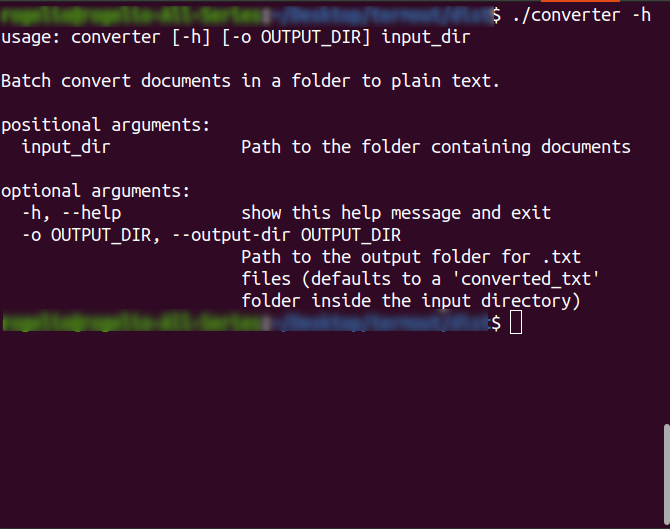
There is only one catch, though: it is unable to treat some of the older file formats. It can't treat the old MS Word format (.doc). If this is precisely your situation, there are some specific tools for that available in Linux, like catdoc or antiword, which is also available for Windows. Convert is also unable to treat the antique PostScript format (the ancestor of PDF). But there is also another popular tool for this in Linux: pstotext. As an immediate solution for users in this situation, we propose to use our online tool Termout.org, which can deal with all these old formats.
|
 FREE PALESTINE!
ABOUT
RESEARCH
SOLUTIONS
SOFTWARE
FREE PALESTINE!
ABOUT
RESEARCH
SOLUTIONS
SOFTWARE
|
Technologies for Linguistic Analysis |
||